
Want your Zoho Books reports on your own letterhead? Print the report to the Fabreasy printer, or save it as a PDF and drag it onto Fabreasy. Fabreasy adds your PDF letterhead and, if you use one, a continuation sheet, on your own Windows PC, without uploading anything. The same works for Word, Excel and any other program that can print.
Step by step:
- Download and install Fabreasy PDF Creator (14 days free).
- Have your letterhead ready as a one-page PDF. In Word you make it with Save As and the file type PDF. A continuation sheet for the following pages is optional.
- Open PDF Letterhead sets in the Dashboard and click Default. Click the thumbnail of the layer on First page only, then Add file…, choose your letterhead and click Use.
- Do the same for the layer on Page 2 to end with your continuation sheet, or remove that layer with ×. In a set you can also add other layers, cover pages or your terms and conditions.
- In Zoho Books, print the report and choose the printer Fabreasy PDF Creator (Printer). In the toolbar that appears, choose the set and click Folder.
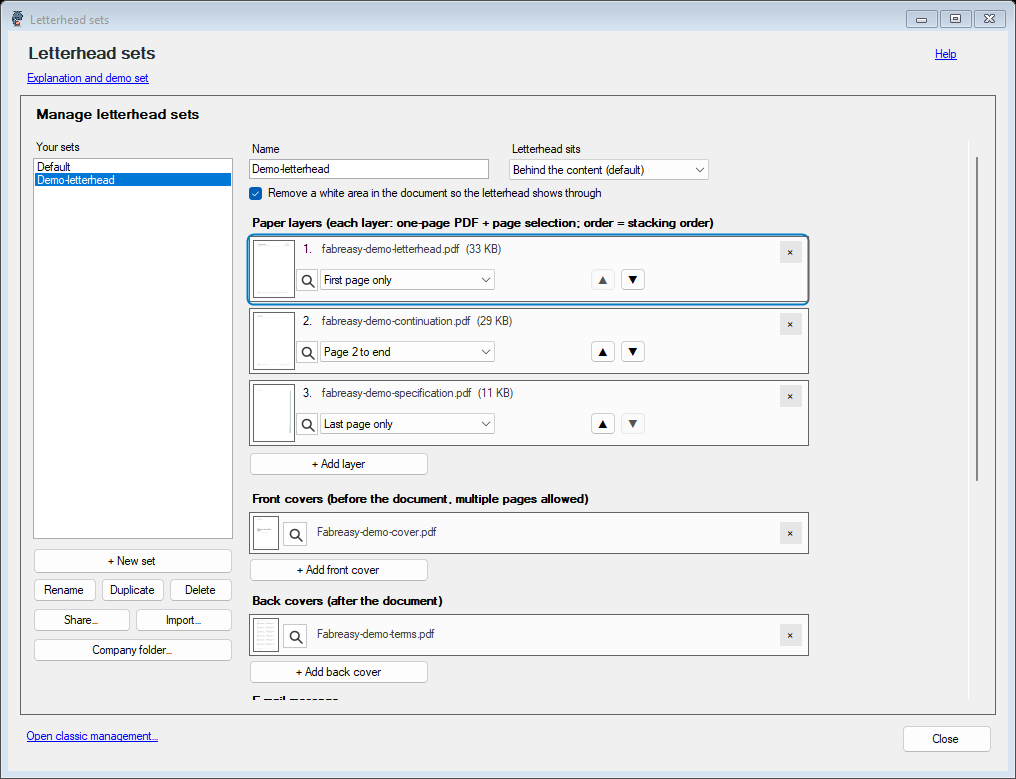
Already have the report as a PDF? Open Drag & Drop in the Dashboard, choose the set under Use letterhead set and drag the PDF onto the Folder box. The result is next to the original, as <name>_Output.pdf. The full explanation is in the manual.
Fabreasy is now ready to add a PDF letterhead to Zoho Books reports. You can now print from any application using the Fabreasy printer driver. The Fabreasy Office Ribbon has been added to Word and Excel, allowing you to create documents with letterhead with just one click. Do you have PDF documents generated from other reporting programs? You can drag and drop these documents into Fabreasy, one by one or in entire folders.
Optional: send the report straight to the right recipient
With SendReady, the paid extension of PDF Creator, you type a label as a line of text on the first page, for example TO:john@company.example. SendReady reads it, adds the letterhead and, if you want, your signature, and prepares the e-mail to that address in Outlook. The label itself does not appear in the PDF.
How to Add PDF Letterhead to Zoho Books Reports? Easily with Fabreasy PDF Creator
Many businesses ask: “How do I add a PDF letterhead to Zoho Books reports?” This is an important question, especially in the era of digital work. Reports are often the first document customers receive, and their appearance says a lot about your company’s professionalism. With Fabreasy PDF Creator, you can easily add a PDF letterhead to Zoho Books reports without losing quality, ensuring a consistent and professional presentation.
Why Add PDF Letterhead to Zoho Books Reports?
Zoho Books reports are a key part of your company’s administration. They are sent to clients daily and must always look professional. By adding a PDF letterhead, you ensure that your company’s branding is clearly visible on every report. This includes your logo, colors, and other branding elements. It strengthens your brand identity and ensures that every report looks as if it were printed on official letterhead.
Integrating a PDF letterhead into Zoho Books reports is a simple way to strengthen your brand identity. By adding a PDF letterhead, you ensure that every document from the system has the professional appearance you expect from printed correspondence.
The Challenge of Adding PDF Letterhead to Zoho Books Reports
At first, adding a PDF letterhead to Zoho Books reports may seem difficult. Many tools that automate this process can reduce the quality of the letterhead, resulting in blurry images or distorted layouts. You want to avoid this, as reports represent your company and must always appear sharp and professional.
With Fabreasy PDF Creator, this issue is resolved. The software ensures that your PDF letterhead is added to your Zoho Books reports with perfect quality, without any loss of resolution or color. This means every report you send will look as professional as a printed version, inspiring confidence in your clients.
Fabreasy: Easy for Everyone to Use
One of the biggest advantages of Fabreasy PDF Creator is its ease of use. Whether you’re an experienced IT professional or less technically inclined, Fabreasy allows anyone to add a PDF letterhead to Zoho Books reports effortlessly. The intuitive interface guides you step by step through the process, allowing you to generate professional-looking reports in just a few minutes.
Moreover, there is no need for complex actions. With Fabreasy PDF Creator, you can quickly and efficiently add your letterhead to your Zoho Books reports without any hassle or technical challenges.
More Than Just Editing Reports
While adding a PDF letterhead to Zoho Books reports is a core function of Fabreasy PDF Creator, the software offers much more. For example, you can also add a visual signature based on text recognition. This means the software can automatically place a signature on a report or document based on its content. This is especially useful for signing reports quickly and automatically without manually editing each document.
Additionally, Fabreasy allows you to split PDF files and adjust layouts. This makes it a versatile tool, perfect for various document management processes within your organization.
Save Time and Prevent Errors
Manually adding a PDF letterhead to Zoho Books reports can be time-consuming and prone to errors. With Fabreasy PDF Creator, this process is fully automated, saving you time and reducing the chances of mistakes. You won’t have to worry about misplacing elements or losing formatting.
The software takes care of the work for you and ensures that every report you generate from Zoho Books is automatically provided with your company’s letterhead. This increases the efficiency and professionalism of your administration.
Fabreasy: The Solution for Zoho Books Reports
As more companies transition to digital documentation, the need for reliable tools to manage Zoho Books reports grows. Fabreasy PDF Creator is the ideal solution for adding a professional PDF letterhead to your reports without compromising quality.
With Fabreasy, you ensure that your reports from Zoho Books always have a professional and consistent appearance. This not only helps you make a good impression on clients but also ensures that your brand identity remains strong, no matter the type of document. Whether you’re sharing reports, creating quotes, or sending other business documents, Fabreasy helps you maintain your corporate identity in every communication.
Thanks to its user-friendly interface, fast processing, and versatile features, Fabreasy PDF Creator is the perfect addition to Zoho Books for anyone who wants to work professionally and efficiently. It allows you to seamlessly add a PDF letterhead to all your documents, resulting in professional-looking reports that perfectly represent your company’s branding.