
PDF letterhead: One click. Branded PDFs.
Invoices, reports & proposals — always on-brand, from any software.
✨ Trusted by 1,000+ professionals worldwide
No costs, no hassle, no registration, cancels automatically
The ultimate PDF letterhead solution including a extensive PDF toolbox — Designed for Windows

PDF letterhead
A PDF letterhead guarantees that every invoice, report or proposal carries a professional and consistent brand identity. With Fabreasy PDF Creator you automatically insert a PDF letterhead into PDFs, Word documents and Excel reports without any extra steps. Your corporate identity stays the same whether you work with different software packages, reporting generators or operate multiple business activities with separate letterhead sets. Fabreasy makes it easy to assemble letterhead, continuation pages and cover pages and apply them in the correct order. You automatically send a perfect PDF that always respects your brand, regardless of the application you are using. The printed letterhead disappears, but your brand identity remains.
Try it free for 14 days — then only €33.50 per year per user. (Site licenses available for teams and offices.)
FAQ: How to get started?
Download and install Fabreasy PDF Creator. Steps after installation:
- In Word, Excel or Drag & Drop, click Setup (red radar icon)
- Open the Letterhead tab and click Select letterhead
- Add your branding (PDF letterhead) and select it
- Click Use selected and then Save
- Repeat this step for continuation pages. You are now ready to use Fabreasy. See the example on the right.
Want to use letterhead sets?
Click Advanced options, then select Help for detailed online instructions.
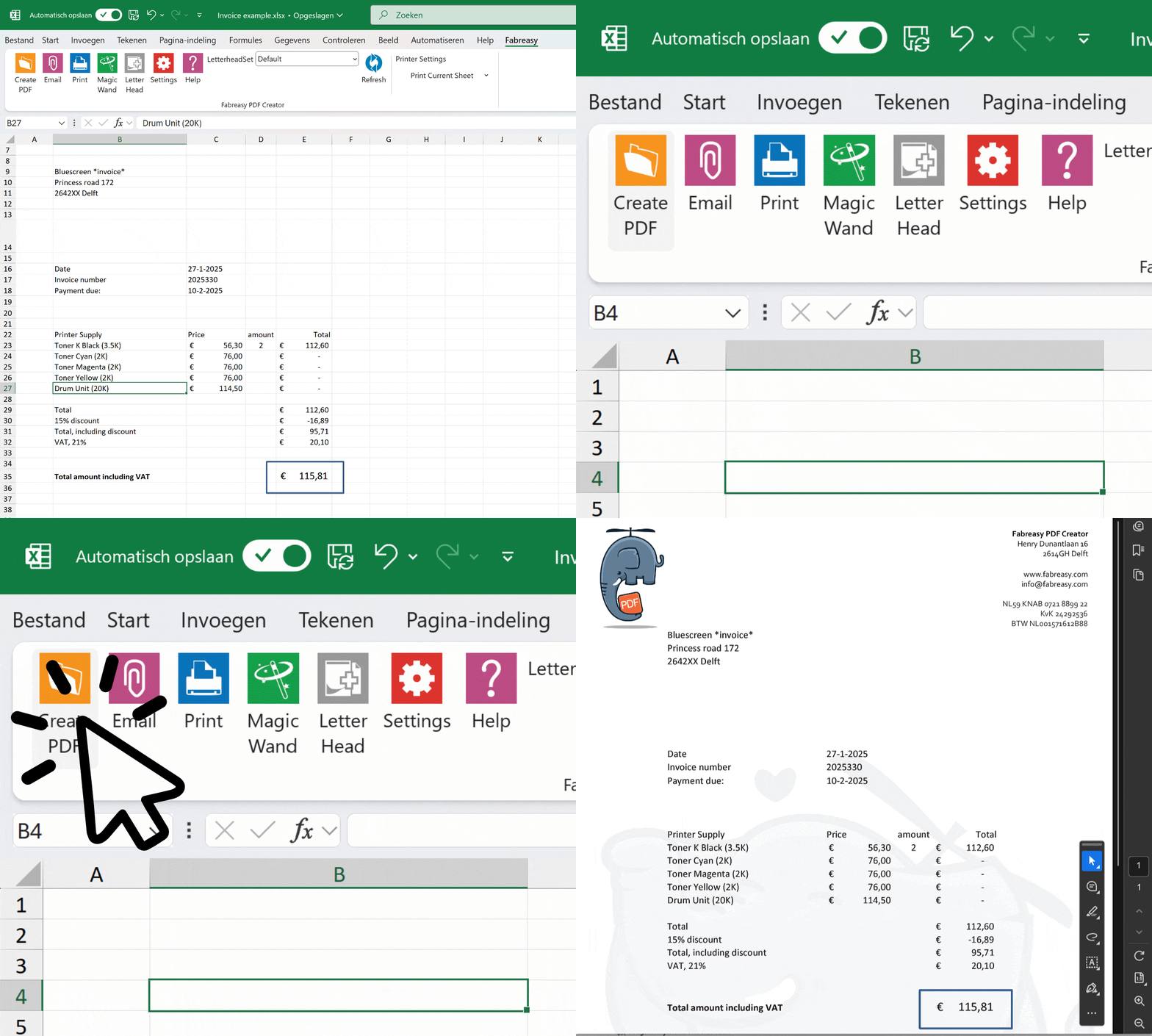
Add your PDF letterhead and signature automatically
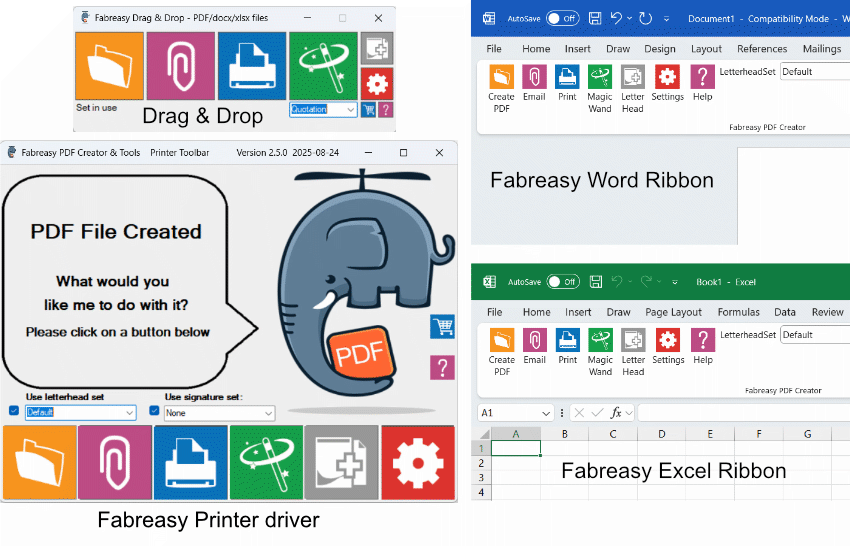
Create PDFs including PDF letterhead quickly and effortlessly
Generate PDFs directly from Word and Excel, or by using the printer driver.
Already have PDFs? Just drag and drop them into Fabreasy.
Want to email instantly in the right branding? Simply click the paperclip
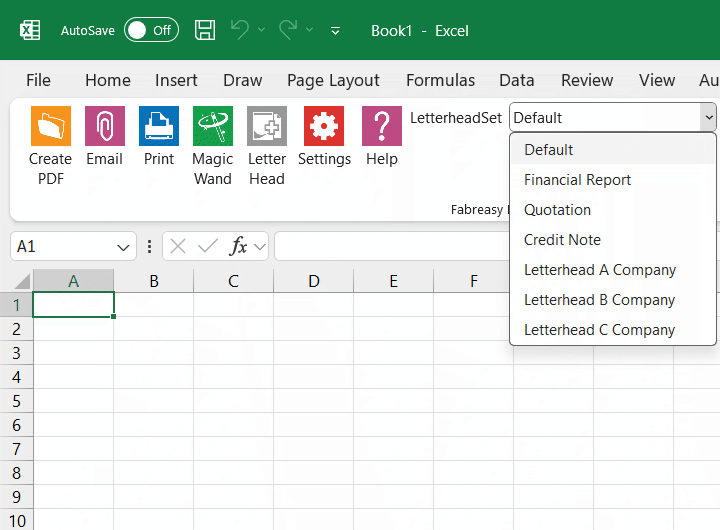
PDF letterhead Sets for different business activities or companies
For example, for invoices, reports, or quotations.
Choose the order in which each type of letterhead is applied yourself.
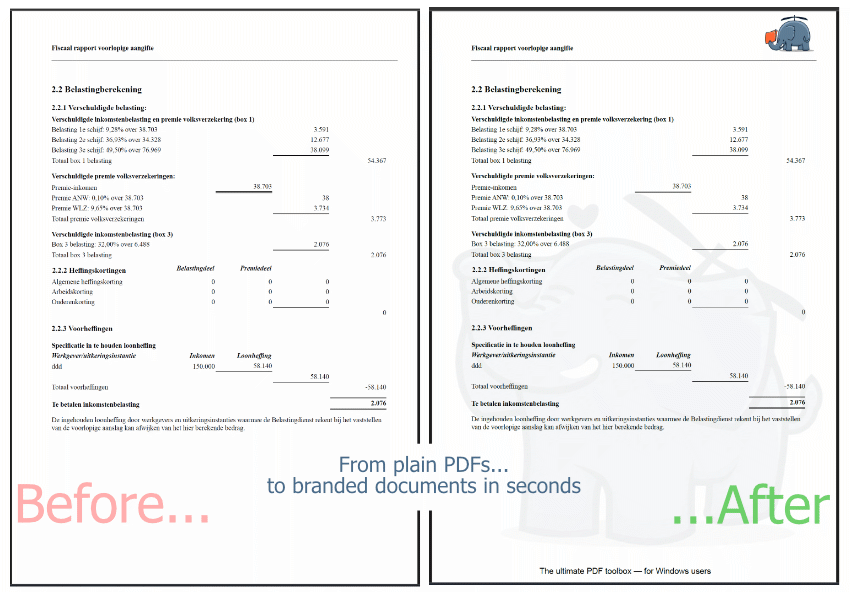
PDF letterhead for your PDF reports
Drag and drop a PDF or entire folders into Fabreasy, and apply your branding to the desired pages.
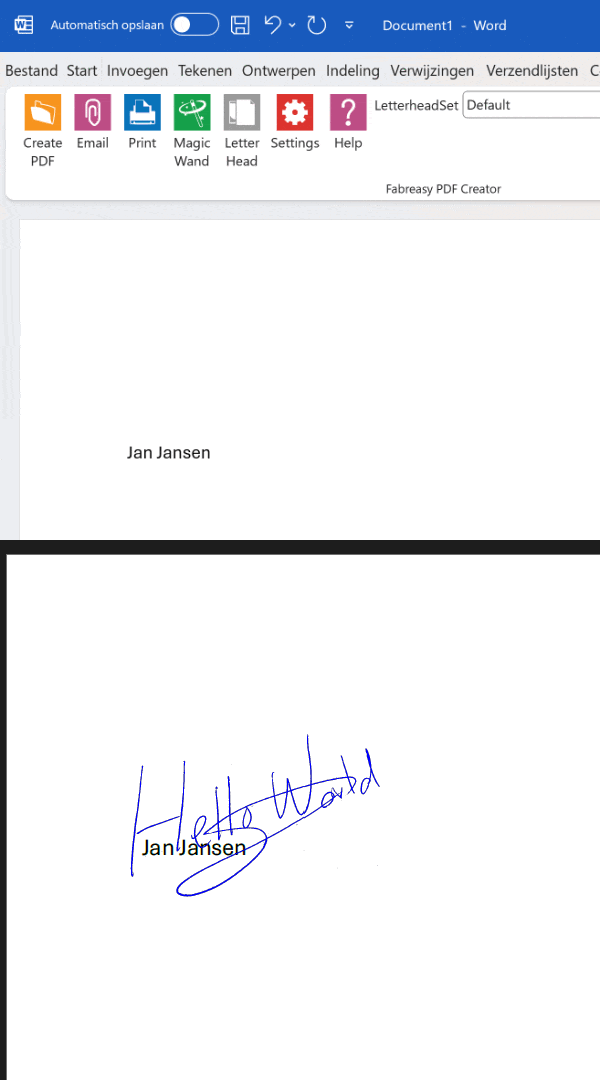
Easily add visual digital signatures
Place a signature in a fixed position or dynamically using text recognition.
No transparent signature yet? Quickly create one with our app.
Secure your PDF documents before sending
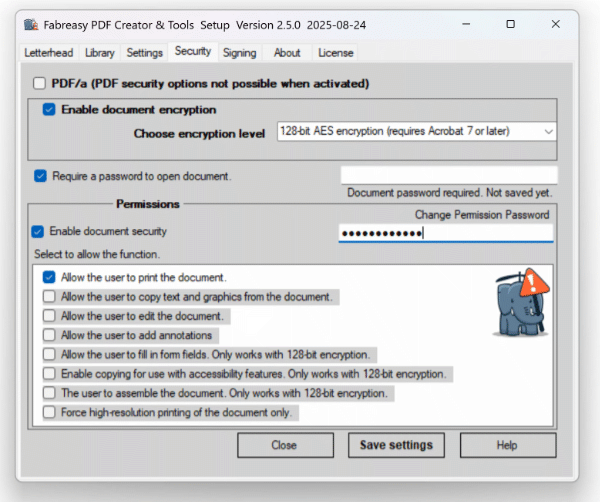
Secure your PDFs effectively and hassle-free
How securely are your PDFs being sent?
Is encryption enabled?
Is document editing disabled?
Can just anyone open the PDF?
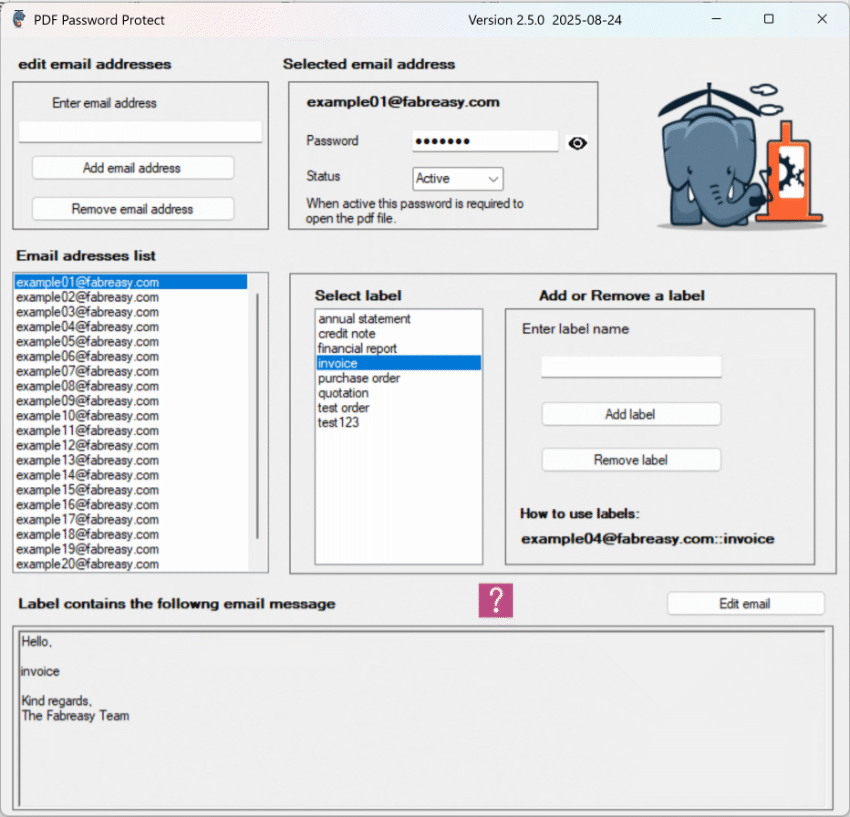
Password-Protect PDFs
Automatically secure PDFs with a password linked to the recipient’s email address — only the intended recipient can open the document. Keep your information safe and GDPR-compliant.
Easily personalize the subject line and email body with labels — saving you time and effort.
To enable automatic passwords, simply add TO:emailaddress:label (please note :label required)
to your document — and you’re all set.
.
Adjust and refine any existing PDF
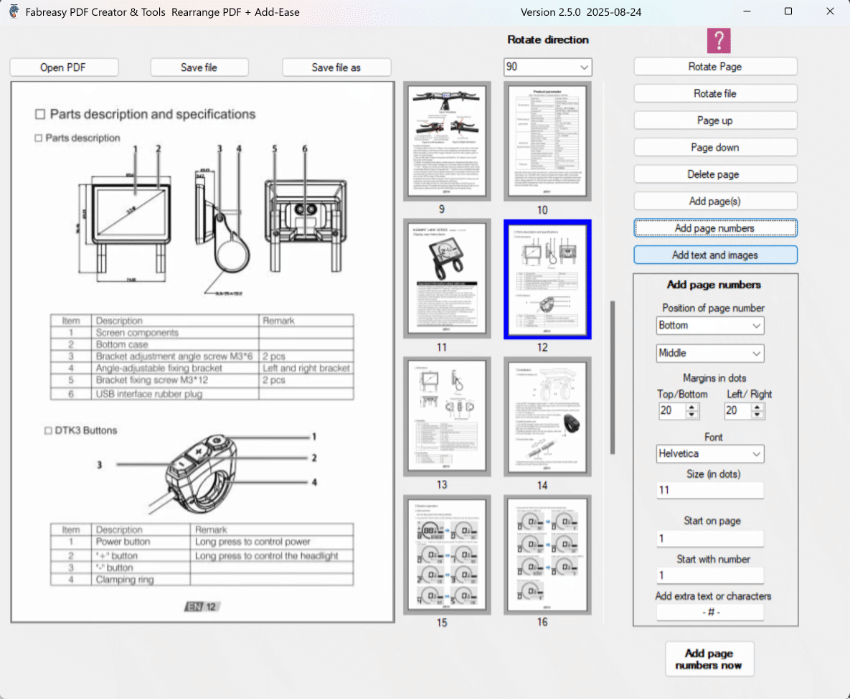
Editing a PDF? Do it effortlessly.
With the Fabreasy page rearrangement tool, you can easily move, delete, rotate, add pages and page numbers within a document.
Add-Ease: Add text and images directly to existing PDFs.
Complete PDF solution in one package
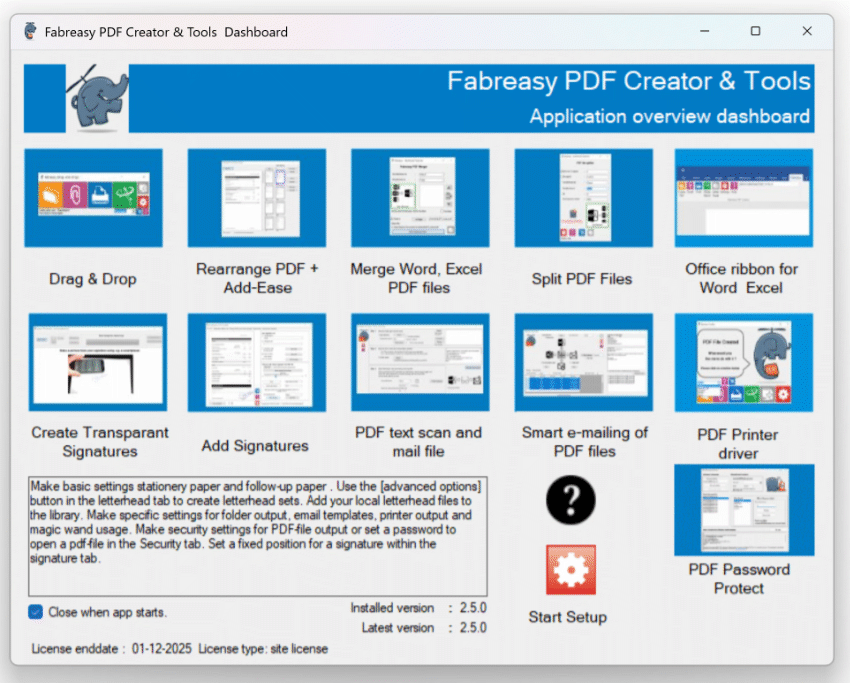
There’s more: Fabreasy Dashboard
All Fabreasy apps are bundled in the clear and intuitive Fabreasy Dashboard, giving you quick access to every feature Fabreasy has to offer.
Users call Fabreasy a Swiss Army knife for PDFs — a versatile tool that makes your daily work easier.
Who relies on Fabreasy — and what makes them choose it?
I want to deliver my reports quickly and efficiently including my PDF letterhead. With Fabreasy, I can — directly from Excel or as a PDF from the reporting system. No hassle with printing and scanning, just a clean and professional end result.
💬 “Our reports always look professional. Thanks to Fabreasy, we save a lot of time and costs every single day.”
As an entrepreneur, I want my quotes and invoices to look professional without extra effort. Fabreasy ensures my PDFs instantly reflect my branding — no hassle in Excel or Word.
💬 “My quotes always look polished. My clients might not even notice, but it gives me a real sense of satisfaction.”
As an IT manager, I aim for more efficient document processes and lower costs. With Fabreasy, we save significantly on printing costs and streamline our workflow by adding PDF letterhead directly to PDFs. On top of that, PDFs are now securely sent to clients.
💬 “With Fabreasy, we have simplified and secured our document processes. Less manual work, more consistency, and substantial cost savings. We can now manage with far fewer MFPs.”
Trusted by 1,000+ professionals

Try it for free, no strings attached!
Start your free 14-day PDF letterhead trial today — no registration, no hassle






















What PDF Letterhead Really Solves in Modern Document Workflows
Most organisations rely on Word, Excel, accounting tools, CRM exports and reporting engines to create the documents they share every day. Those tools are great for producing content, but they are terrible at keeping your visual identity consistent. Logos shift, margins vary, spacing changes and every colleague ends up exporting a slightly different PDF.
The result: a scattered brand image that looks unprofessional from the outside.
A PDF letterhead breaks that pattern. It separates your visual identity from the software that generates the document. Instead of manually formatting each file, a PDF letterhead (or overlay) ensures that every exported document automatically includes your layout, colours and typography — exactly as intended. It is a reliable and repeatable system that keeps your brand consistent across all platforms.
Fabreasy PDF Creator makes this entire process automatic. Every time you create a PDF from Word, Excel or any other application, Fabreasy applies the correct letterhead in the background. No more fixing margins, adjusting headers or pasting templates. It’s a workflow upgrade dressed as a branding tool.
First Page, Following Pages and Long Documents
Professional documents often need different layouts. The first page usually carries more design elements, while the following pages need a cleaner layout.
Fabreasy handles this automatically.
You can define:
-
a detailed first-page design
-
a simplified layout for following pages
-
and a continuation sheet for longer documents
This ensures that multi-page reports, financial statements, proposals and contracts stay clean and consistent without overwhelming the reader.
Especially for companies that generate large PDFs from portals or reporting systems, uninterrupted multi-page branding is essential — and Fabreasy delivers that with zero extra work.
One Central Source for All PDF Letterhead Templates
Instead of scattering templates across departments and laptops, Fabreasy stores everything in one central place.
Whether your organisation has:
-
multiple brands
-
several business units
-
or departmental variations
…each one can have its own PDF letterhead set.
Updating your brand?
You update the template once, and everyone instantly uses the new version.
Zero manual steps. Zero mistakes.
Accuracy, Automation and Fewer Errors
Manual formatting inevitably leads to:
-
outdated letterheads
-
shifted logos
-
missing headers or footers
-
incorrect margins
-
inconsistent branding choices
These small mistakes make a big impact.
With Fabreasy, every document receives the correct overlay — instantly, accurately and without user intervention. Teams work faster, fewer errors slip through, and documents look consistently professional.
Whether your team generates ten PDFs per day or hundreds per week, automated PDF branding saves time and prevents brand drift.
A Branding Layer That Works Across All Platforms
Modern organisations work with dozens of tools: ERP, CRM, financial software, project systems, cloud portals and more. Regardless of where the PDF originates, the brand output must be consistent.
A PDF letterhead is the only approach that works everywhere.
If a system can export a PDF, Fabreasy can apply the correct letterhead.
That makes it useful not just for office tools, but also for complex reporting environments and document-heavy workflows.
From small businesses to multi-department organisations, automated PDF branding introduces order and consistency into the document process.
Deliver the Right Brand Impression Every Time
Every PDF you send is a brand moment.
Invoices, proposals, reports, letters — they all communicate professionalism or the lack of it.
A consistent PDF letterhead reinforces trust and clarity.
An inconsistent layout confuses customers and looks careless.
Fabreasy ensures that every document, from a single-page confirmation to a fifty-page report, carries the correct look and feel — automatically and reliably. Your brand stays clean, recognisable and professional in every situation.